How to Switch to Web POS EXE
How to Switch to Web POS EXE

Vendtill Web POS
Description
- Vendtill Web POS offers a feature - the ability to run as an EXE file. This option provides users with a seamless way to use the Web POS without relying on a web browser. Discover the advantages of this feature and learn how to enable it for a faster and more convenient experience.
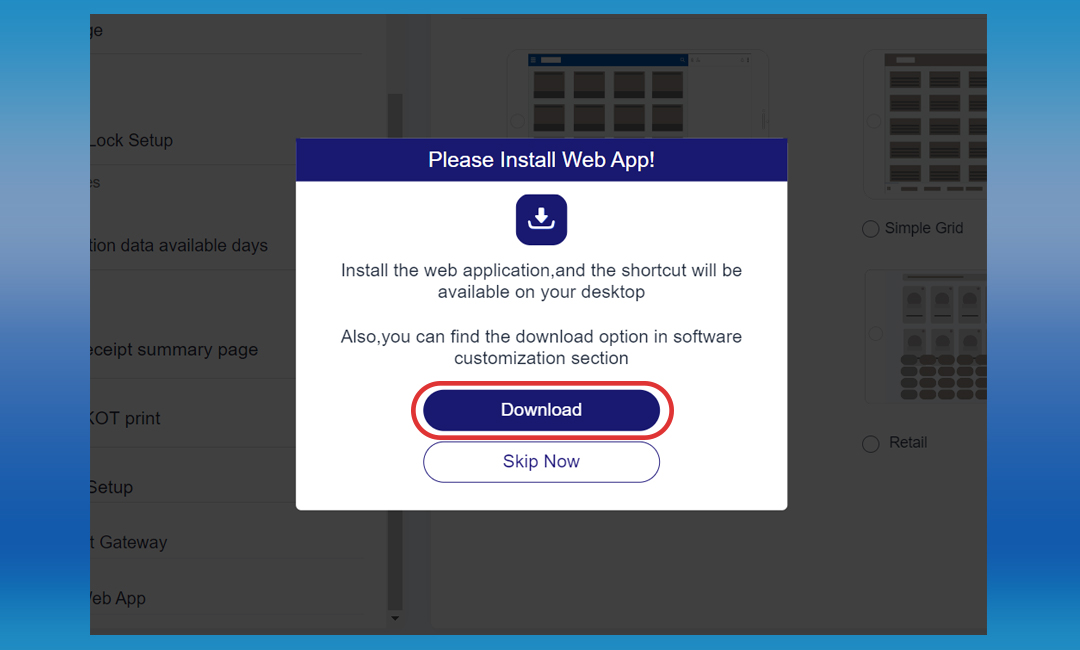
- Once the EXE file is downloaded, a shortcut will be created on your desktop. Double-click on the shortcut to open Vendtill Web POS. For quick access, consider adding it to your Task Bar for one-click opening.
- Key Benefits of the EXE File Option:
- Faster Deployment: Installing the POS system as an executable file is quicker and more straightforward compared to setting up a web-based system. Get started swiftly without the complexities of browser-based installations.
- Enhanced User Experience: In a web-based system, using multiple tabs may lead to issues for users. With the EXE file option, enjoy a smoother user experience without concerns about tab-related complications.
- How to Enable the EXE File Option:
- New Users: Registering for the First Time: After completing the registration process, a separate window will appear for you to download the Web App.Once the EXE file is downloaded, a shortcut will be created on your desktop. Double-click on the shortcut to open Vendtill Web POS. For quick access, consider adding it to your Task Bar for one-click opening.
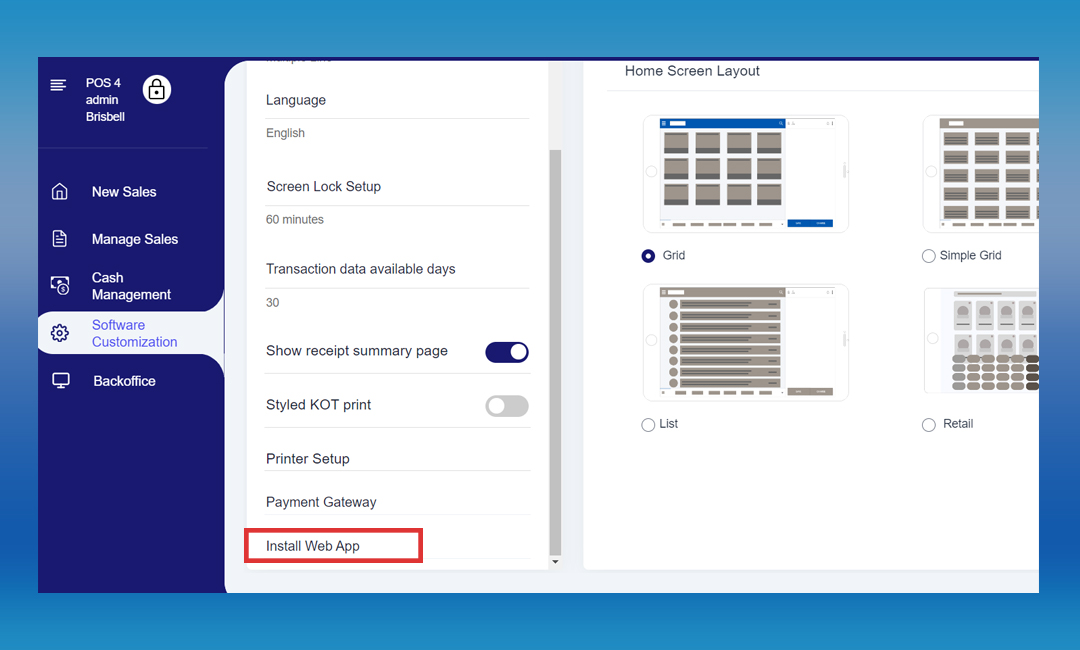
- Existing Users: Switching from Browser to EXE: If you are already using Vendtill Web POS in a browser and wish to switch to the EXE file option, follow these steps:
1. Login to Web POS > Click the main menu > Select the “Software Customization ”
Related Articles
Let's Get Started with Vendtill Web POS App
Let's Get Started with Vendtill Web POS App Vendtill Website > 'Register for Web App' Special Note To access Vendtill Web POS seamlessly, it is recommended to use the Exe File option. After downloading, a desktop shortcut will be created for easy ...How to Connect Printer to Web POS App
How to Connect Printer to Web POS App Vendtill Web POS Main Menu > Settings > Printers You can connect a network printer to the Web POS terminal using Ethernet Cable and the router. Connect one end of an Ethernet cable to the Ethernet port on the ...Vendtill Web POS – Retail Layout
Vendtill Web POS – Home Screen Layout & Quick Cash Option Step-by-step Vendtill Web POS allows businesses to customize the home screen layout to meet specific operational needs. This flexibility ensures enhanced usability, improved workflow, and ...WebPOS Interface with Dark Mode Light Mode
Vendtill is excited to introduce a refreshed WebPOS interface, designed to deliver a faster, smoother, and more comfortable experience for your daily business operations. This update brings a modern new look, performance improvements, and the ...Web Store
What is Web Store ? Step-by-step guide The POS System now incorporates a "Web Store" feature, allowing businesses to present their products on a dedicated URL. Customers can easily place orders through this web store, where they can also include ...