Integrate QuickBooks
Integrate QuickBooks (Offline)

Step By Step
Step By Step
Vendtill POS system offers seamless integration with QuickBooks accounting and bookkeeping software. This integration enables you to download receipts in CSV format and easily upload them to QuickBooks.
1. Log in to the POS Back Office Web-portal
2. Select “Integrations” from the main menu
3. Go to the “Apps”
4. Tick ON “QuickBooks”
5. QuickBooks will be enabled and available under “Add-on Apps” in the Integrations section.
6. Select QuickBooks Integration and select the “Offline” method
7. Enter a valid date and time range, and select the correct SHOP
8. Click the download CSV option
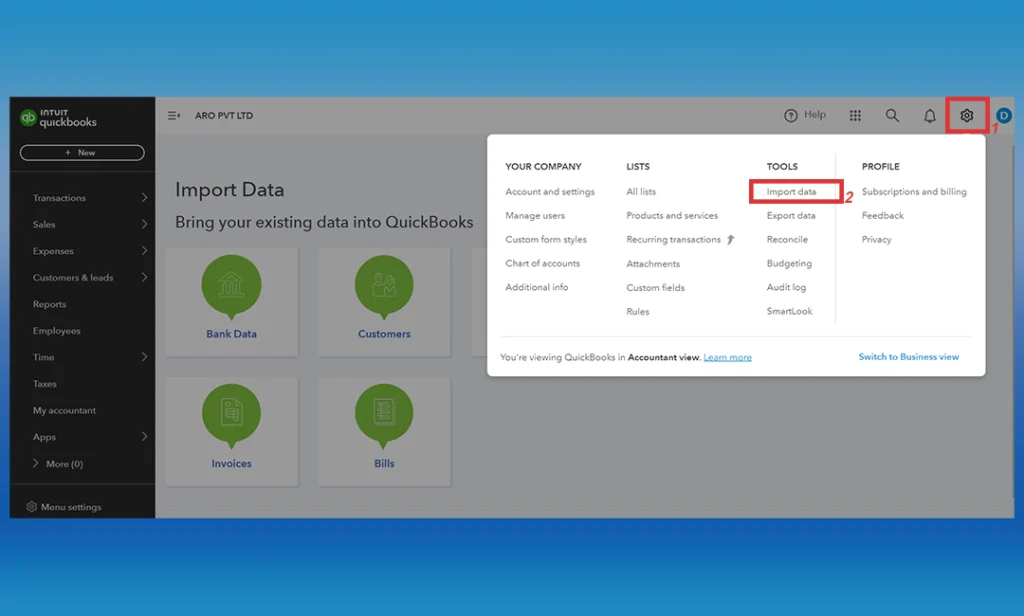
9. Upload the CSV to the QuickBooks “import data” section
Enter a valid date and time range, and select the correct SHOP
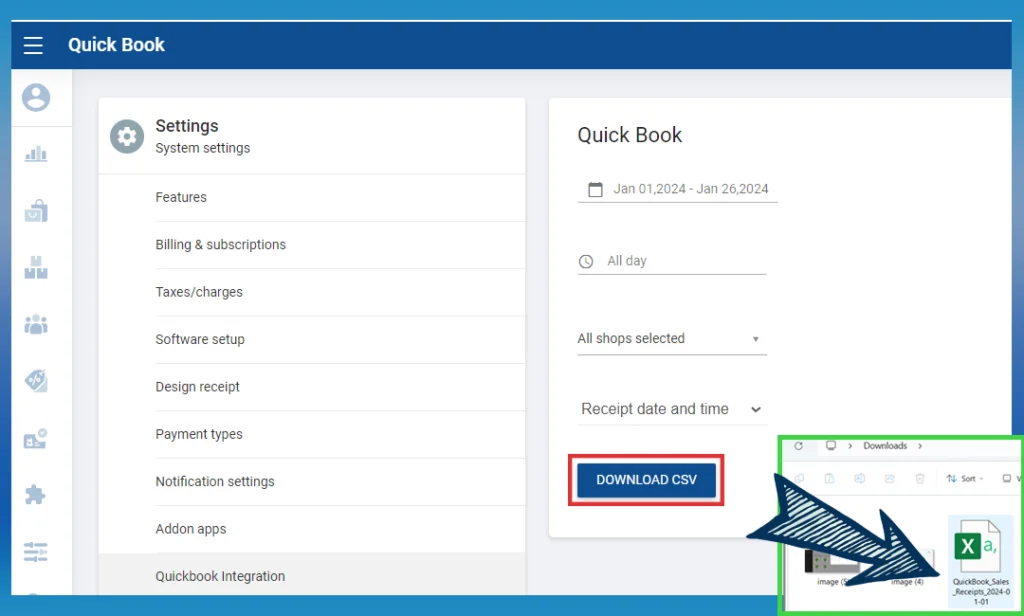
- Click download CSV option
Upload the CSV to the Quickbook “import data” section
Related Articles
How to Integrate QuickBooks with Vendtill
Integrate QuickBooks (Online) Step-by-step Vendtill POS Now Fully Integrates with QuickBooks Vendtill POS has introduced a full integration with QuickBooks, allowing businesses to automatically sync their sales data, invoices, and payment records ...How to Use Xero Accounting Software with Vendtill POS
How to Use Xero Accounting Software with Vendtill POS Vendtill Back Office Why Integrate Xero with Vendtill POS? Integration provides a comprehensive and streamlined solution for managing financial operations directly from your POS system. 1. Login ...QR Ordering System
What is QR Ordering System Step-by-step guide A QR Ordering System is a digital solution integrated into a Point of Sale (POS) system that allows customers to browse and order items from a menu by scanning QR codes with their smartphones. This system ...REST API Access for Integration
REST API Access for Business Integration Step-by-step How to Get Vendtill REST API Access for Business Integration If you're looking to integrate Vendtill POS with your own inventory, accounting, or ERP system, our REST API allows you to securely ...Webhook
Vendtill POS Webhook – Real-Time Notifications Step-by-step What is a Webhook? A webhook is a way to get real-time updates from the Vendtill POS system. It helps your system or app stay updated automatically when something changes in Vendtill, like ...