Cash Rounding Report
Cash Rounding Report

Vendtill Back Office
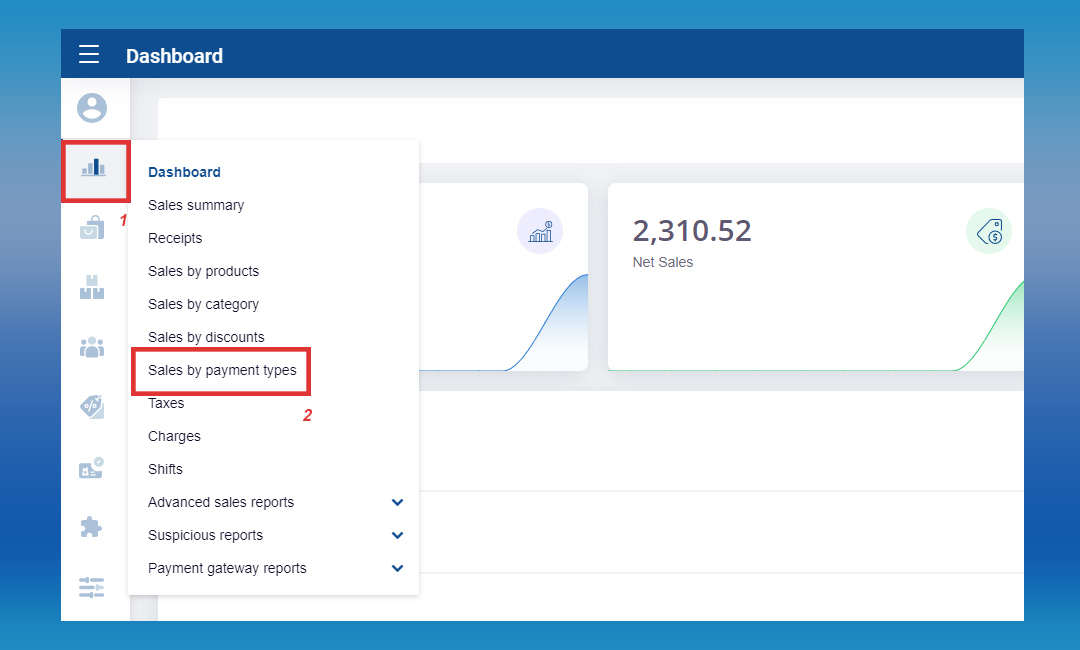
Login to POS Back Office > Select “ Reports” from the main menu > Go to the “Sales by payment type”
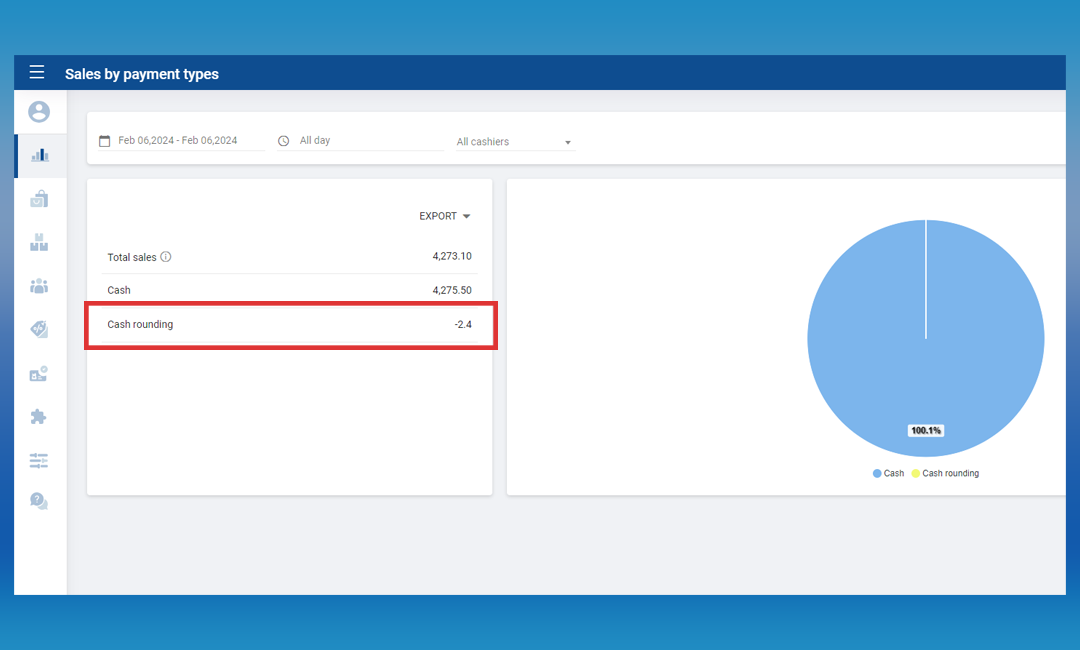
Under “Cash rounding” you will see the figures
Rounding
POS System provides users with the flexibility to select two types of rounding.
- Rounding
- Manual Rounding
1. Rounding
The bill total is rounded to the nearest multiple of the smallest denomination, which may be higher or lower than the unrounded total.
This rounding is applied to the total of a bill.
Ex: Suppose the total bill is $ 9.90, You need to round the total amount & issue the receipt with $ 10 in POS. Now system can do this automatically and you can print the total amount as well for any particular payment.
2. Manual Rounding
Manual Rounding in Vendtill POS System provides users with the flexibility to round the bill total to any desired value, allowing for precise customization when standard rounding intervals and rules may not be sufficient.
This feature proves particularly useful in scenarios where complex calculations involving taxes, discounts, or specific business requirements result in a total amount that requires manual adjustment.
Let's consider an example:
Item Price: $100
Tax: 10%
Discount: 15%
After applying these calculations, the total amount is $93.50. However, the user desires a rounded amount of $93. In such cases, the Manual Rounding option comes into play, enabling the user to override the automated calculations and set a specific total value according to their preferences.
Moreover, this feature accommodates businesses operating in countries like Bahrain, where financial transactions involve three decimal places. The capability to manually round the total amount is especially beneficial in regions with unique decimal requirements, ensuring compliance with local financial practices.
Related Articles
How to Use Cash Rounding
How to Use Cash Rounding Vendtill Back Office Cash-Rounding Option The bill total is rounded to the nearest multiple of the smallest denomination, which may be higher or lower than the unrounded total. This rounding is applied to the total of a bill. ...How to Set Up Manual Cash-Rounding
How to Set Up Manual Cash-Rounding Vendtill Back Office Manual Rounding Option Manual Rounding option empowers you to fine-tune the bill total according to your specific needs, whether it involves adjusting for customized discounts, handling ...Shift History Report
Shift History Report Vendtill POS App POS App main menu > Select “ Manage Sale ” Click “Cash Management” Select the “Clock” icon right-hand upper corner Click the “clock” icon and select the dateShift Report with Sales Summary
Shift Report with Sales Summary Vendtill Back Office 1. The shift report with sales summary is a crucial component for any type of business. It provides a concise overview of sales data, capturing important information from a specific shift. 2. The ...How to Enable the Blind Cash Up Feature
What is Blind Cash Up Feature Step-by-step guide The new "Blind Cash Up" feature in the Vendtill POS App enhances security by preventing potential fraud by cashiers or users. With this feature, cashiers won't see the expected cash amount during their ...